WooCommerce and European ERPs: connector or API, system by system
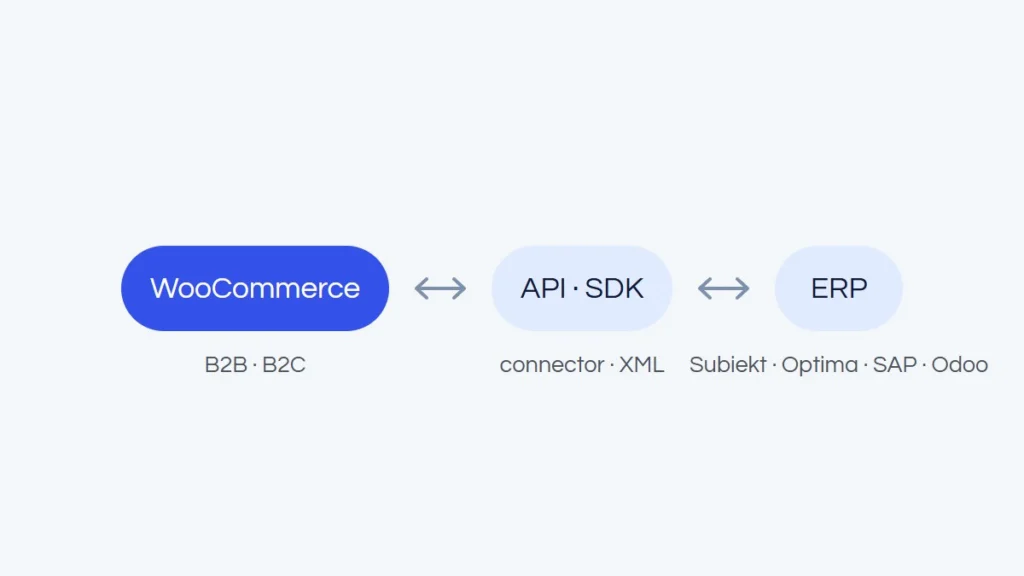
"Can WooCommerce talk to our ERP?" The honest answer is almost always yes. The useful question comes next: how exactly, with your system, license and server. Stores on SAP Business One, Exact Online or POHODA all end up with products, stock and orders in sync, but the route, the cost and the weak points differ.
This article goes system by system. The general picture (a single source of truth, queues, what drives the cost) is in our WooCommerce ERP integration guide, and how we run a project from research to launch is in how we design ERP integrations. Here we stay with the systems and the problems that cost the most time.
Three routes: connector, API or files
- A ready-made connector (middleware). A plugin, a program next to the ERP or an integration platform that moves the standard data: products, stock, orders. Quick to start, paid by license or subscription, limited to the features its authors planned.
- The ERP's API. A documented interface (REST, OData or a vendor SDK) that our own code talks to. More work up front, but the integration follows your fields, price lists and statuses.
- File exchange. XML or CSV files moved on a schedule. Older and slower, still common in accounting software.
Just as important: where does the ERP run? A cloud ERP is reachable at any time, within the vendor's request limits. An ERP on an office server is usually not reachable from the internet, so a connector or service has to run inside that network, and the machine has to stay on, because the store also sells at night.
SAP Business One: the Service Layer
SAP Business One exposes its data through the Service Layer (REST, OData and JSON), alongside an SDK for add-ons. It runs on premise or in the cloud, on SAP HANA or Microsoft SQL Server, and since version 10.0 PL01 the Service Layer runs on Windows as well as SUSE Linux. On premise, the store reaches the Service Layer through a VPN, a proxy or middleware inside the network. Product pictures live as files in the picture folder set in the general settings. WooCommerce connectors come from SAP partners and third-party vendors.
Microsoft Dynamics 365 Business Central: API v2.0 and webhooks
Business Central has a standard REST API (v2.0), enabled by default online and switched on separately on premises, plus webhooks for items, customers, sales orders and more, so the integration reacts to changes instead of polling. Online, each user can run 5 OData requests at a time and 6,000 in a 5-minute window, after which the API answers "429 Too Many Requests". Webhook subscriptions expire after three days unless renewed. Business Central ships with a built-in Shopify connector; for WooCommerce it is a third-party app or custom work.
Odoo: the JSON-2 API and a plan question
Odoo 19 introduced the JSON-2 API, called with an API key. The older XML-RPC and JSON-RPC endpoints are deprecated and scheduled for removal in Odoo 22 (fall 2028) and Odoo Online 21.1 (winter 2027), so integrations built on them have an expiry date. On Odoo Online, the external API is available only on Custom plans, not on One App Free or Standard: check this first. Odoo has its own eCommerce app, so WooCommerce next to it makes sense mainly when the store and its SEO already live in WordPress.
Exact Online: a cloud API with tight limits
Exact Online is reached through its REST API and XML web services, with OAuth2 and an app registered by a developer. The limits are the real constraint: 60 calls per company per minute and 5,000 per day, up to 30,000 per day with a Premium license, and repeated errors can temporarily block the key. Webhooks exist for many endpoints, so a good integration sends only what changed instead of downloading the whole catalog every night.
Sage: first ask which Sage
"We use Sage" can mean very different products. Sage Accounting is cloud software with a public API (v3.1). Sage 200 has a REST API with OAuth 2.0, enabled by default in Sage 200 Standard and set up by the business partner in Professional. Sage 50 Accounts in the UK is desktop software reached through Sage Data Objects, COM libraries available to members of the UK Sage Developer Programme. Same brand, three different projects.
DATEV: accounting, not stock
DATEV, a German cooperative that makes software for tax advisers, auditors and small businesses, keeps the books, not the stock. The usual link from a store is booking data for the tax adviser: the DATEV format (a CSV file with a fixed "EXTF" prefix) or DATEV's online interfaces, which require registration and a technical review by DATEV before going live. Stock and orders stay with an ERP or in WooCommerce itself.
POHODA and the Polish systems from our projects
The Czech POHODA exchanges data as XML, through file import and export or POHODA mServer, an HTTP server built into the program. mServer runs only while POHODA is running, and Stormware advises against keeping it on permanently or running it as a Windows service, recommending scheduled start and stop. Synchronization happens in planned windows, not in real time. We have connected POHODA with WooCommerce, and product images were the hardest part. The XML schema shows why: a stock item carries only the image file name, and the file must already sit in the company's pictures folder on the POHODA machine.
In Poland we have connected WooCommerce with Subiekt GT, for example through the SubSync connector, and with Comarch ERP Optima. Subiekt GT has no web API: external programs use Sfera, a paid COM add-on, on a Windows machine with SQL Server that has to stay on.
The systems at a glance
| System | Integration route | Where it runs | Vendor's own e-commerce option |
|---|---|---|---|
| SAP Business One | Service Layer (REST, OData), SDK | On premise or cloud | Partner add-ons |
| Business Central | API v2.0, webhooks | Online or on premises | Built-in Shopify connector |
| Odoo | JSON-2 API (old RPC until 2027-2028) | Odoo Online or self-hosted | Odoo eCommerce |
| Exact Online | REST, XML web services, webhooks | Cloud | Partner apps |
| Sage | Depends on the product | Cloud or desktop | Depends on the product |
| DATEV | DATEV format files, online APIs | DATEV data center, desktop | Partner solutions |
| POHODA | XML, mServer (HTTP) | Windows, on premise | Generic XML link for online shops |
The hard part: moving, mapping, checking and testing
The channel itself is rarely what goes wrong. The work and the risk sit in four places.
Moving an existing integration from an old platform
Often the company sells on Magento, Shopware, PrestaShop or a home-grown shop linked to the ERP for years, and moves to WooCommerce. The ERP still carries traces of the old setup: IDs from the previous shop, custom fields written by the old connector, statuses tuned to the old flow. What we watch:
- A shared key. Products are matched on the ERP item number stored as the WooCommerce SKU, never on the old shop's internal ID, which disappears with the migration.
- Switch-over order. The old integration stops writing to the ERP before the new one starts, or the same order lands twice and stock drops twice.
- Orders in flight. Orders paid in the old shop but not yet shipped need one agreed path to completion.
- Data kept the old connector's way. Attributes, descriptions or image paths stored in custom ERP fields have to be found and carried into the new mapping.
Field mapping: where data usually drifts
- Variations. One variable product in WooCommerce is often one item per size or color in the ERP. You need a rule for grouping them.
- VAT. ERP tax codes have to land in the right WooCommerce tax classes, shipping included. Cross-border sales add cases: above the EUR 10,000 EU threshold, consumer sales carry the customer's country VAT (One-Stop Shop), and goods sold to a business with a valid EU VAT number are generally invoiced without VAT.
- Rounding. WooCommerce can round tax per line or at subtotal level, while the ERP calculates the document its own way. One cent of difference can block an order import.
- Customers. Consumer or business, VAT number, separate billing and shipping addresses, and matching customers already in the ERP.
- Statuses and documents. Which store status creates a sales order, which one an invoice, and what happens on cancellation or refund.
- Images and characters. ERP images are often files on a server disk, and older file formats can mangle accented characters.
Verification: how you know the data is right
"It runs" is not the same as "it adds up". Before launch we compare both sides on numbers:
- a discrepancy report listing every SKU with stock and price on both sides;
- test orders for real cases: a business with a VAT number, a consumer, a coupon, free shipping, mixed VAT rates, a variation, a refund;
- each ERP document checked against its order to the cent, shipping included;
- a daily check of stock and orders for the first days after launch.
A test environment on the ERP side too
A staging copy of the store is standard, but the ERP needs a safe place for tests too, because every test order creates a real document there. Depending on the system we prepare, with the client, a copy of the ERP database or a test company, a second warehouse that the integration reads during tests, a test product hidden from customers, and invoicing switched off or in test mode (in countries with mandatory e-invoicing, an issued invoice cannot simply be deleted; see e-invoicing for WooCommerce stores in Europe). Some cloud systems help: Business Central Essentials and Premium include three sandbox environments, and a copy of production starts with webhooks disabled and the job queue stopped. Odoo Online can duplicate a database "for testing purposes", with emails, payments and delivery orders disabled, for 15 days.
Cost and time
A ready-made connector means a license or subscription, sometimes plus an ERP module or a higher plan, and a limited feature set: fine for a simple catalog, tight once custom fields, customer price lists or unusual statuses appear. We quote a custom integration after a short conversation about your ERP, data and scope. From agreed decisions to launch it usually takes 2-4 weeks. What drives the price is covered in our integration guide.
Does WooCommerce have a built-in connector for SAP, Business Central or Odoo?
No. WooCommerce provides a REST API and webhooks, and each ERP provides its own interface. The link between them is either a third-party connector or custom code.
Running an ERP and planning a WooCommerce store, or a move from another platform? See how we build ERP, PIM and CRM integrations and the Kalvei B2B store, which syncs with its ERP in real time, checks companies in the Czech ARES register and generates XML files for trade partners. Then describe your system in the free quote form and we will tell you plainly which route makes sense.