How we design ERP integrations: no magic, no vendor lock-in
Integrating an ERP with WooCommerce is one of the more complex projects in eCommerce, but the difficulty rarely lies where the client expects it. The API is not the hard part. The hard part is that the data on the two sides almost never matches, and every company has spent years developing its own way of keeping it. That is why it can’t be done “from a template”, and that is exactly why we follow a repeatable process instead of improvising.
Below we show how we work on an integration like this: from the first conversation, when we don’t write a single line of code, through testing, to launch and what comes after it. No magic and no beating around the bush, because in this area transparency matters more than catchy slogans. If you are looking for the bigger picture (which systems we work with, which problems keep coming back, what e-invoicing changes and what drives the cost), read our guide to WooCommerce ERP integration.
Before we start: what we need from you
Very little is needed to begin. We need to know which ERP you use, get access to it and receive the documentation of its API or integration module. You don’t have to prepare sample data: with access to the ERP, we check for ourselves what your products, orders and business partners look like.
We start with a conversation and research, not with code
We come into existing data and a way of working that your company has built up over the years. So first we talk: how everything works on your side, who uses what and what matters most to you. Then we do our own research, usually over two or three days: we go through the ERP, its documentation and how products, orders and business partners are really stored.
At the end we tell you plainly how we see it and present two things: an integration plan and a rollout plan. This is not an audit with a thick report of errors. We adapt to what you already have, and if something cannot be done, we say so straight away. Errors in the ERP itself are rare. Sometimes, though, we suggest what is worth improving in the workflow so the integration has an easier job.
Every implementation is different, even on the same ERP. Two companies on the same Comarch, Subiekt or SAP Business One can have completely different field mappings, status dictionaries and rules, because each built its process its own way.
Scope: what, in which direction and why
Together we decide what the integration should look like. Does data flow one way or both ways? Which data really has to reach the store, and which has to reach the ERP? Not everyone needs everything, and that is fine.
This is where things come up that are easy to forget. Some ERP fields serve internal purposes only and should never appear in the store. A product often has two names: the trade name the customer sees and the technical name it is booked into the warehouse under. All of this has to be settled at the start, because every such decision costs more later.
Field mapping is a job for a human, not a script
Once we know what the data looks like and what you need, we move on to mapping, that is, deciding which field on the ERP side corresponds to which field in the store. It sounds like the perfect task for automation, and that is exactly why so many vendors have failed at it. Automation handles the typical case but falls apart at the first exception, and in business data, exceptions are the rule.
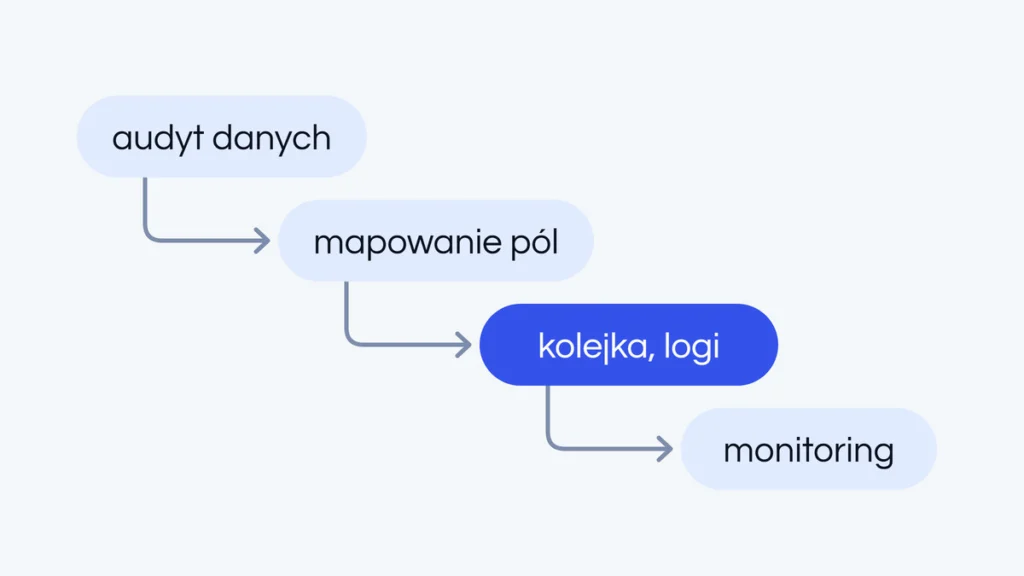
That is why we do the mapping by hand, together with the client, on real records rather than a clean example from the documentation. We go through unusual products, historical orders and odd statuses, because they decide whether the integration will be reliable or will generate silent errors. This stage is less impressive, but it is what separates an implementation that works from one that only looks finished.
Architecture: a queue, idempotency, logs
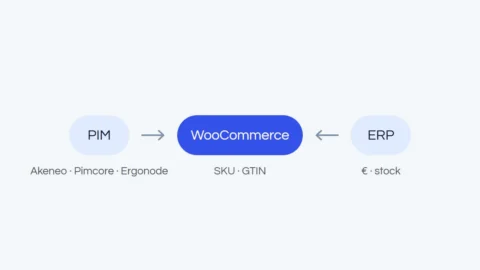
We build the synchronization itself as a simple but resilient mechanism: a job queue with a one-way data flow and a single, unambiguous source of truth for each data type. The ERP owns products and stock levels, WooCommerce owns orders. This way the two sides don’t overwrite each other, and conflicts disappear before they arise.
Every operation is idempotent, meaning it can be safely repeated without the risk of duplicating data, and every operation leaves a trace in the log. When the ERP stops responding for a moment, jobs wait in the queue instead of getting lost, and once the connection is back, everything completes on its own. These invisible decisions are what make an integration hold up during a sales peak, not just on a quiet Tuesday. This is how the integration works in the Kalvei B2B store, among others, which synchronizes with its ERP in real time.
Testing: on a copy first
An integration is best tested on a copy of the ERP or on a separate test warehouse. Then we can run products, stock and orders through it without touching real sales. If a copy is not possible, we at least create a test product and check the whole flow on it.
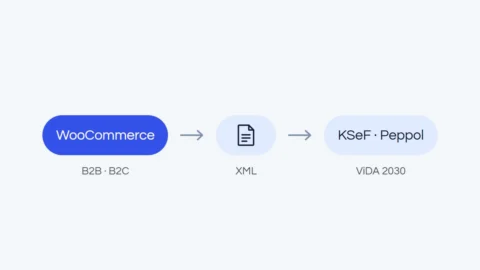
Invoices are a separate matter. More and more EU countries require e-invoices between businesses, and from July 1, 2030, EU rules make them the norm for cross-border B2B sales too. Once an invoice has gone through a mandatory e-invoicing system, it is a real tax document: you cannot simply delete it, you can only correct it. In Poland, for example, the Ministry of Finance’s KSeF manual states that an invoice which has received its KSeF number cannot be canceled or deleted, and that errors are fixed with a corrective invoice. In Belgium, structured invoices travel over the Peppol network directly between the seller’s and the buyer’s software, so a test invoice sent by mistake would land with a real customer.
That is why, during testing, we switch automatic invoicing off or put it into test mode, if the invoicing software has one. Tax authorities may also offer their own test environments. In Poland, for example, the Ministry of Finance runs a pre-production (Demo) version of KSeF in which issuing invoices has no tax consequences.
How long it takes
From the moment the decisions are made to launch, an integration usually takes two to four weeks. Sometimes it is faster, but it depends on our current workload and on how quickly all the details can be agreed. With integrations this important, haste is not your friend: an extra week on decisions costs less than a month of fixing stock levels that have drifted apart.
After launch: alerts and oversight
An integration that works today will not necessarily work a month from now. An ERP update, a configuration change or a new product type is enough for something to stop adding up.
We agree the scope of alerts with each client: which synchronization errors they need to hear about and who should receive them. Ongoing monitoring is part of our maintenance package: for clients who have it, we watch site availability, important changes and updates, and integration problems. And when major security updates come out, we let our clients know on our own initiative.

No dependence on a single vendor
One more principle sets our approach apart. We don’t lock the integration inside a proprietary plugin that nobody but us understands and that ties you to a single vendor forever. We write it so that it can be maintained and developed further, including by another team.
After launch you get a working solution, documentation and instructions, because for us “finished” means your company is genuinely in control of what it received. We want to be your partner because we work well together, not because you have no way out. That is more honest and, frankly, healthier for both sides in the long run.
Frequently asked questions
How long does an ERP and WooCommerce integration take?
Usually two to four weeks from the decisions to launch. It depends on the scope, on how quickly we agree the details and on our current workload.
What do I need to prepare?
Information on which ERP you use, access to it and the documentation of its API or integration module. Sample data is not needed: with access to the ERP, we review it ourselves.
How do you test the integration without issuing real invoices?
Ideally on a copy of the ERP or a test warehouse, and if that is not possible, on a test product. During testing, automatic invoicing is switched off or runs in test mode, because an invoice issued through a mandatory e-invoicing system, such as KSeF in Poland, cannot be deleted, only corrected.
How much does an ERP integration cost?
We quote each integration after a short conversation about your ERP, your data and the scope. What drives the price is explained in our WooCommerce ERP integration guide.
Planning an ERP integration and don’t want to depend on a single vendor? See how we build ERP, PIM and CRM integrations, request a free quote or write to us, and we will break your case down piece by piece before we write a single line of code.