PHP vulnerability (PHP2Shell): what to do on hosting, old PHP and servers
Published October 23, 2026, updated October 26 (timeline and the first confirmed attacks).
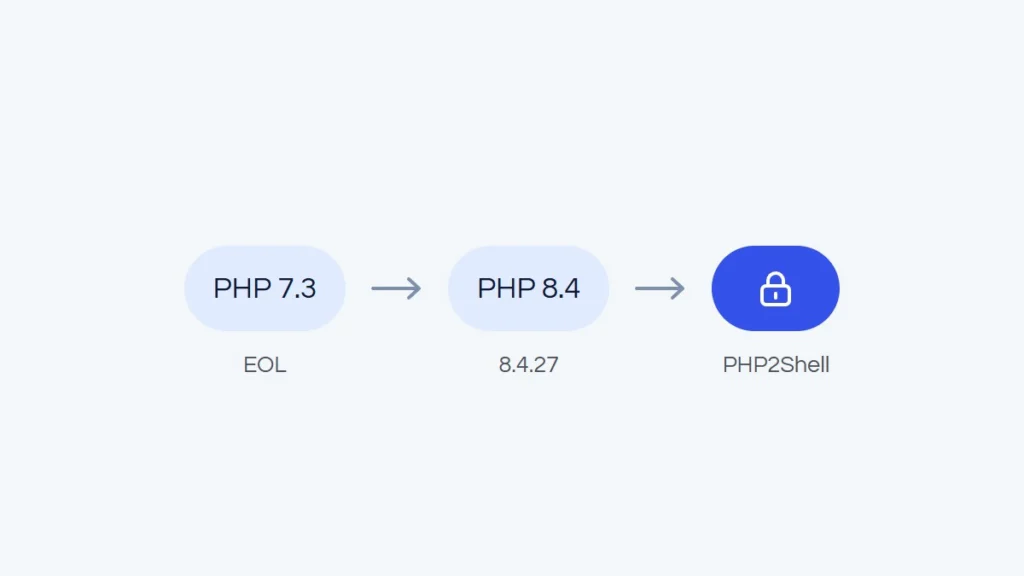
On Wednesday, October 21, 2026, a few minutes after 15:30 Polish time, the PHP team released fixes for two critical flaws in the language engine itself (CVE-2026-109618 and CVE-2026-109619). The researchers who found them called them PHP2Shell, and the media quickly dubbed the whole situation the “PHP-ocalypse”. A bit of an exaggeration, but only a bit: the flaws allow a server takeover without logging in, and PHP runs WordPress, WooCommerce, PrestaShop and even Wikipedia.
Within a day, Polish site Wykop went offline and sent its users to Facebook, the Wikimedia Foundation reported disruptions on its wikis and deliberately took some supporting services offline, and the Polish government’s IT center switched off public information (BIP) sites running on its central system. Hosting companies patched servers through the night. Below we sort out what happened and explain what to do in three typical situations: on shared hosting, on an old PHP version (such as 7.3) and on your own dedicated server or VPS.
What happened, in short
Both flaws concern how PHP handles memory while processing requests. The first (CVE-2026-109618) involves running out of memory while request data is being prepared. The second (CVE-2026-109619) concerns data that can be reused by a later request after an earlier one has finished. As a result, an attacker can run their own code on the server remotely, without an account or password. Common web server setups are affected: PHP-FPM, Apache with mod_php (the most exposed, according to the PHP team), php-cgi, FrankenPHP and LiteSpeed.
The fixed versions are 8.2.35, 8.3.36, 8.4.27 and 8.5.12. For 7.4, 8.0 and 8.1, which are no longer supported, the PHP team published source-level fixes that Linux distributions and hosting companies use. The PHP team stresses that there is no complete workaround: updating is the only safe option.
One thread in this story shows where we are today. The flaws were found independently by Calif, Wiz and OpenAI, with help from AI models. Attackers did not wait for the full details: Amazon’s honeypots recorded the first exploitation attempt on October 17, four days before the fixes were published. The window for a relaxed update “next week” has all but disappeared. We also write about what AI changes in store security in Can AI build an online store?.
Timeline
Times are given in Polish time (CEST, UTC+2).
- August 2026. Calif and Wiz independently report remote code execution bugs to the PHP team. In September, OpenAI reports the same root cause. Work on the fixes continues confidentially.
- October 17 (Saturday). Amazon’s honeypots record the first exploitation attempt.
- October 20 (Tuesday), evening. The CVE numbers leak. The PHP team announces a critical release and moves it forward from Thursday to Wednesday.
- October 21 (Wednesday), morning. CERT Polska issues a warning and advises temporarily switching off public PHP services where possible. Cloudflare enables protective rules in its web application firewall (WAF) and reports the first attacks.
- October 21, around 15:30. The PHP team releases 8.2.35, 8.3.36, 8.4.27 and 8.5.12, plus source fixes for 7.4, 8.0 and 8.1.
- October 21, afternoon and evening. Wykop takes the site offline and redirects users to its Facebook page. The return, planned for 17:00, slips to around 20:00. Once back, Wykop says the shutdown was preventive and that all its environments now run patched PHP. Wikimedia warns of disruptions on its wikis and deliberately takes some supporting services offline, including Toolforge and Cloud VPS. In the Netherlands, the tech site Tweakers and the parliament’s website, among others, go offline as a precaution.
- Night of October 21 to 22. Hosting providers patch their servers, including old PHP versions. CloudLinux, used by many providers, ships patched PHP from 5.2 to 8.5. Zenbox and dhosting finish by early morning, and Hostinger reports the update complete at 8:44.
- October 22 (Thursday). home.pl and SEOHOST confirm all PHP versions are patched, including old ones. Poland’s Ministry of Digital Affairs says the Central IT Center has temporarily switched off BIP sites on its SSDIP system. Browsing them comes back that afternoon. Sansec concludes that public exploits do not work against default PHP installations, so mass exploitation is less likely than feared.
- October 23 (Friday). The PHP team publishes an additional notice about an issue related to session upload progress (CVE-2026-115560) and recommends disabling session.upload_progress until the next bugfix release. Reports emerge of botnets joining the attack attempts. OVHcloud finishes patching the oldest PHP versions (5.3-7.3).
- October 24-26. Update from October 26. The first credible confirmation of a successful attack in a real environment appears: a honeypot running Apache, mod_php and PHP 8.4.26, in a setup that favored the attacker. CrowdSec counted 1,187 IP addresses attempting to exploit the flaw between October 21 and 25, with no confirmed compromises in its data.

How to check which PHP version your site uses
- WordPress: Tools > Site Health > Info tab > Server section.
- PrestaShop: Advanced Parameters > Information.
- Hosting panel: the PHP settings for your domain. Some providers also show the PHP build date, for example Hostinger in PHP Info.
What matters is the full version number, not just “8.3”. Note: Linux distributions and some hosting providers patch older versions without changing the number (Hostinger and SEOHOST, for example, warn about this). In that case, the build date or the provider’s notice tells you whether the fix is in place, not the number itself.
Shared hosting: should you worry?
Less than owners of their own servers, but not zero. On shared hosting, the provider updates PHP, and this time most large companies did it fast: within a day, often overnight, and also for old versions the PHP team no longer supports. A few examples from official notices of Polish and European providers:
- home.pl deployed firewall rules and a special PHP configuration even before the fixes were published, and on October 22 finished updating all versions, including 8.1 and older.
- Hostinger rolled out patched versions from 5.2 to 8.5 by October 22, added firewall rules and disabled session.upload_progress.
- cyber_Folks deployed the official fixes for 8.2-8.5 and its own patches for 5.x, 7.x, 8.0 and 8.1.
- Zenbox and dhosting patched all versions overnight from October 21 to 22, and SEOHOST confirmed all versions were secured, including old ones.
- OVHcloud updated versions 7.4-8.5 on October 21 and the oldest ones (5.3-7.3) by October 23.
Not every provider published a notice, which does not necessarily mean they did nothing. If your host is not on the list, check its status page or ask support.
What to do on shared hosting:
- Check your provider’s notice or ask support directly whether the PHP version on your account has the fixes for CVE-2026-109618 and CVE-2026-109619.
- If your site runs on PHP older than 8.2, plan a version change. A host’s patch for an old version is a crisis exception, not a return to full support.
- Update WordPress or PrestaShop, plugins and the theme. The PHP flaw grabbed the headlines, but outdated plugins are still the most common way in.
- Make sure you have a current backup stored outside the server.
One thing remains out of your hands: on shared hosting, one server serves many accounts. They are isolated from each other, but how fast a provider reacts in a week like this is a good test of whether you are in the right place.
A site on old PHP, such as 7.3: what now?
PHP 7.3 has had no fixes since December 6, 2021, 7.4 since November 28, 2022, 8.0 since November 26, 2023, and 8.1 since the end of 2025. This time many hosts patched these versions too, but that is the exception, not the rule. For 7.3, the PHP team did not even prepare source fixes, and a site on that version is exposed to every vulnerability of recent years, not just PHP2Shell. On your own server it is harder still, because not every panel and repository released fixes for the oldest versions.
Why do sites stay on old PHP? Usually for one of three reasons: an old theme or plugin breaks on PHP 8, the store runs on PrestaShop 1.6 or 1.7, or someone once added custom code that nobody wants to touch. Understandable, but every month of delay increases the risk. The upgrade plan:
- Backup of files and database, stored outside the server.
- Test copy of the site on PHP 8.3 or 8.4 (8.2 only has security support until the end of 2026).
- Update the CMS, plugins and theme and fix incompatible code. PHP 8 removed some deprecated functions (such as create_function and each), and some errors that PHP 7 only reported as warnings stop the site in PHP 8.
- Test forms, cart, payments, admin panel and integrations.
- Switch the version in production and watch the logs for a few days.
If your store runs on PrestaShop 1.7, changing PHP alone will not do, because that version does not officially support PHP 8. We cover this in PrestaShop 1.7 migration to version 8 and 9.
If you cannot update right away, the PHP team described temporary settings that reduce the risk (including disabling session.upload_progress and limiting upload sizes). It also says they do not make an installation safe. Treat them as a bridge for a few days, not a solution.
Dedicated server or VPS: updating is on you
On your own server, nobody will do it for you. Hosting providers say plainly that VPS and dedicated server customers have to update PHP themselves. A checklist:
- Inventory. Check every installed PHP version. One server often runs several at once, for example separate PHP-FPM pools for different sites.
- Update from the right source. Update packages where your PHP comes from: your distribution’s repository (Debian and Ubuntu released fixes), Ondřej Surý’s repository, Remi, or a panel such as cPanel, Plesk or DirectAdmin. On older systems, check whether your version got a fix at all (for example, fixes for Ubuntu 20.04 and 18.04 are available through Ubuntu Pro).
- Restart. Restart PHP-FPM and the web server. The package manager usually does it for you, but not always, and running processes keep using the old code until they restart.
- Verify where the site runs. The php -v command in a terminal shows the CLI version, which can differ from the one serving your site. Check the version in your CMS or in a phpinfo page opened in the browser, then delete that file.
- Containers. Rebuild images on a patched base image and redeploy. The official Docker images got fixes for 8.2-8.5, not for older versions.
- Signs of a break-in. Since the first attack attempts came before the fixes, review the server for changes since October 17: new PHP files (especially in upload directories), new admin accounts, unknown cron jobs, unusual outbound traffic. If you find anything, treat it as an incident: restore a clean backup, rotate passwords and keys, and report it to your national CERT.
- Next step. PHP 8.2 only has security support until the end of 2026, so while you are updating anyway, go straight to 8.3 or 8.4.
You can hand the PHP update on your server to us
If you run a dedicated server or VPS without an administrator at hand, we will do it for you. We will check which PHP versions run on the server and where the packages come from, update PHP, test WordPress, WooCommerce or PrestaShop on a copy and switch over without downtime. Along the way, we will review the server for signs of a break-in. We can also take over regular updates, so that the next time a flaw like this appears, nobody has to work through the night.
On shared hosting, we will help you move your site or store from old PHP to a current version. Describe your server or site in the free quote form, or start with a website and store audit, which also covers server security.
What this week teaches us
PHP is sometimes mocked as the language of “old websites”, yet this week showed how much of the internet still runs on it: from Wikipedia and Wykop to government sites and millions of online stores. It also showed two things worth remembering. First, the time from disclosure to the first attacks is now measured in hours, and sometimes attackers are faster than the fix. Second, a well-organized industry can respond within a single night, but only where someone is responsible for updates. A site everyone forgot about, on a server nobody watches, will not patch itself.
Frequently asked questions
Does updating WordPress or PrestaShop protect against this flaw?
No. The flaw is in PHP itself, so PHP on the server has to be updated. PrestaShop reminded merchants of this directly.
Is Cloudflare or another firewall (WAF) enough?
Firewall rules, such as those deployed by Cloudflare or hosting providers, make attacks harder but do not replace updating. The PHP team stresses there is no complete workaround.
I am on shared hosting. Do I need to do anything?
Check your provider’s notice and your PHP version. If you use a version older than 8.2, plan to change it, and update plugins and the theme either way.
How do I know if someone has already broken in?
Typical signs are unknown PHP files, new admin accounts, modified theme files, unknown cron jobs and unusual outbound traffic from the server. If in doubt, order a security review.