Page builders and widgets: why they make starting easier and growing harder
Page builders did something good for WordPress: they let people without a technical background build a site without touching code. Elementor, WPBakery, Divi and similar tools work on a drag-and-drop basis, and you see the result immediately. No wonder they became the default choice for many beginners and for agencies that want to deliver fast and cheaply.
The catch is that what speeds up the start often slows down everything after it. A builder solves the problems of the first week and creates new ones over the next two years. Below we explain the trade-off, what we use instead and what to do if your site already runs on a builder.
Where the convenience comes from
A visual editor gives instant feedback: you move an element, change a color or add a section and see the result straight away. For someone who does not know HTML or CSS, the website stops being a black box. That is real value.
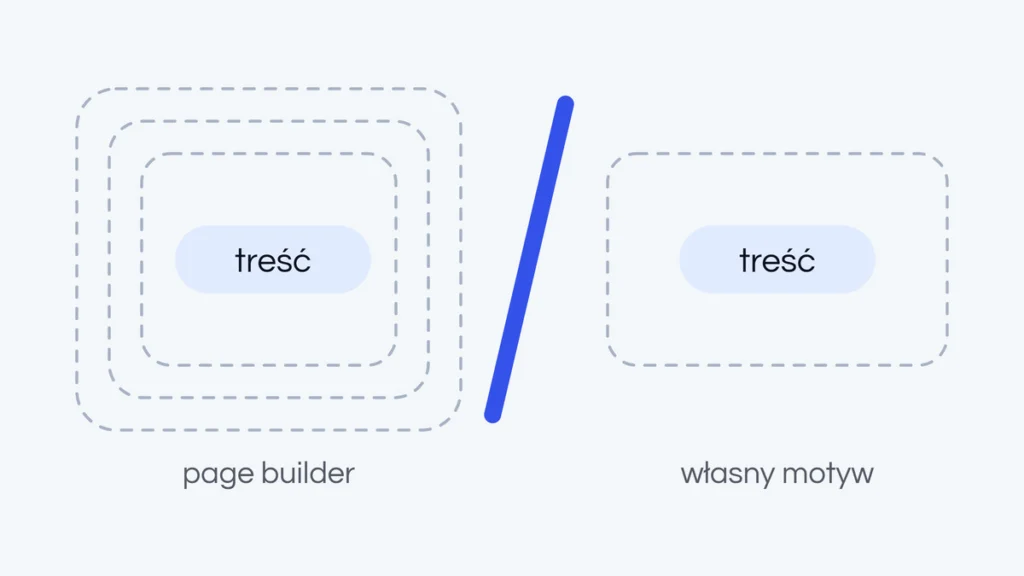
But the convenience has a source: to let anyone place any element anywhere, the builder generates a large amount of generic code that can cope with every scenario. That code is where the later trouble starts.
The price performance pays
A builder page usually loads far more code than a page written for one specific design. Nested containers, extra stylesheets and scripts loaded just in case add up to weight the browser has to download and process on every visit. The result is slower loading and worse Core Web Vitals.
Core Web Vitals are Google's three measures of how a visit feels: main content visible within 2.5 seconds (LCP), a response to a tap or click within 200 milliseconds (INP) and a layout that does not jump while loading (CLS of 0.1 or less). Google says good results align with what its core ranking systems seek to reward, and speed affects conversion too: some visitors leave before the page appears.
What counts is real users. The Core Web Vitals report in Google Search Console is based on field data from Chrome users, judged at the 75th percentile of visits and separately for mobile and desktop. A quick test on your office connection proves little if your customers in Lyon, Munich or Gdańsk browse on an average phone over mobile data.
One myth while we are at it: Google does not measure the ratio of text to code. Google's John Mueller has said plainly that it is not a ranking factor. Excess code still hurts indirectly by slowing the page down, especially on phones.
Accessibility: the law looks at the result, not the tool
Since June 28, 2025, the European Accessibility Act (Directive (EU) 2019/882) has applied to e-commerce services provided to consumers. National laws implement it, for example the Barrierefreiheitsstärkungsgesetz (BFSG) in Germany and the act of April 26, 2024 in Poland. Websites of covered services must be perceivable, operable, understandable and robust. Microenterprises providing services (fewer than 10 employees and an annual turnover or balance sheet total of no more than EUR 2 million) are exempt. More in our article on online store legal requirements in 2026.
The law judges what visitors and assistive technologies receive, not the tool behind it. A builder site can be made accessible, and vendors work on it: Elementor's 3.26 release notes list several accessibility improvements. But much of a builder's HTML comes from generic widgets, so when an audit finds a problem, the fix depends on what the widget allows. With blocks written for the project, the developer fixes the markup once, and every page using the block gets the fix.
How builders block the way forward
The second, less obvious cost is lock-in. Content and layout are tightly bound to the builder. Switch it off or change the theme, and the content often falls apart into unreadable markup, so the site practically has to be rebuilt from scratch.
Then comes the snowball effect: a missing feature gets added with another plugin, then another, until every change risks a collapse. The longer such a site lives, the harder and more expensive even a small change becomes.
Updates and licenses: two problems few people mention
Elementor is the builder we meet most often on clients' sites, and it shows that a builder is not only a performance question. Version 3.26, released in December 2024, finally removed the old styling mechanism called Schemes, which had been replaced by global colors and fonts back in Elementor 3.0. Elementor itself called the change very risky, especially for sites using add-ons. Themes and add-ons that nobody had updated could trigger a fatal error and take the whole site down.
The second problem is licenses. Elementor Pro is a paid subscription, and clients often do not renew it after the first year. Sometimes whoever built the site used their own license and never handed it over. According to Elementor, the free features keep working, but Pro gets no more updates, access to existing Pro features may be limited, and updating only the free plugin while Pro stays outdated can cause compatibility problems. From then on every update is a risk, and putting it right costs extra.
Technical debt you can't see in the demo
All of this adds up to technical debt: the hidden cost of decisions made for now. In the demo the site looks great and the problem is asleep. It wakes up at the first serious change, migration or traffic spike.
And it grows quietly: no dramatic moment when something breaks, just a series of increasingly expensive small fixes, until rebuilding is simpler and cheaper than patching.

What we use instead of a builder
We build our sites on the WordPress block editor, Gutenberg, with our own blocks and ACF fields. Gutenberg is built into WordPress and can do a great deal, but it is not a strictly visual tool, so it does not add needless nesting and extra code. Pages are lighter and faster as a result.
Clients do not lose convenience. On practically every page where it is needed, they edit the content themselves, and the blocks can be reused on other pages, so a new section does not mean a new job for a developer. We explain how this works in our article on how ACF speeds up design changes.
Already on a builder? Two routes
Optimization without a rebuild
A builder site can be made faster without a rebuild, and we do this work, but it is not the most efficient route. What helps: a properly configured cache such as LiteSpeed Cache, Redis on a server that supports it, not loading assets on pages that do not need them, and optimizing the images and the theme, all without major changes inside the visual editor. It is painstaking work, and part of the result depends on the server. A good first step is a website audit that shows what is really slowing your site down.
Rebuilding on a custom theme
Moving from a builder to a custom theme means, in practice, rebuilding the site from scratch, a bit like renovating an old house to today's standards. Most often it is a new site with the content migrated and the current visual style kept. If you were planning a visual refresh anyway, it makes sense to redesign everything at the same time.
When a builder is a good choice and when it isn't
This is not a manifesto against page builders. For a simple landing page, a short campaign or a very tight budget, a visual editor can be a reasonable, deliberate compromise. If the site will live for a few months and does not have to fight for every hundredth of a second, a builder will do the job.
It is different when the site has to carry a business for years and be fast, visible in search, accessible and ready to grow. Then lightweight code written for the project pays for itself, because it gives you performance, security and freedom to change things. We build so that the code can be maintained and developed, including by someone else, with no magic plugins and no builders in the critical layer.
Frequently asked questions
Does Elementor hurt SEO?
Not by itself, but heavy code slows the page down, and speed affects search visibility and conversion. The more sections and add-ons, the harder it is to keep good Core Web Vitals.
Can I edit the content myself without a builder?
Yes. On a site built with the block editor, custom blocks and ACF fields, you edit text, images and sections in the dashboard, and you can reuse the blocks on other pages.
What happens when an Elementor Pro license expires?
According to Elementor, the site keeps working without Pro updates, and access to existing Pro features may be limited. Over time, an updated free version and an outdated Pro can stop fitting together.
How much does it cost to move from a builder to a custom theme?
In practice it means building the site again with the content migrated, so the cost depends on the number of pages, the features and whether the current look stays. We prepare a quote after a short conversation.
Have a builder site that is slowing down or holding back growth? Get in touch, and we will assess whether optimization is enough or whether a solid foundation is the better investment. See also how we build WordPress websites and WooCommerce stores.