PHP vulnerability (PHP2Shell): what to do on hosting, old PHP and servers
The critical PHP vulnerabilities of October 2026 allowed a server takeover without logging in. A timeline, how hosting…
Read moreUpdates, backups, a monthly security audit and a report. No minimum term.
A website or store that nobody updates starts causing trouble over time: plugins stop working together, security gaps appear, and a broken checkout can stop sales for days before anyone notices. In our maintenance package we do this regularly for you.
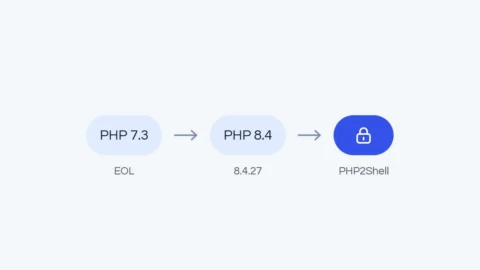
We look after WordPress websites and WooCommerce and PrestaShop stores, including ones we didn’t build: then we start with a free initial review. There is no minimum term. A recent example of why updates matter is the PHP2Shell vulnerability.
We check versions, plugins, licenses and backups. For a site built by someone else, this is a free initial review.
Before every update we back up the database, then update WordPress, WooCommerce and the plugins.
We check the layout, forms and checkout. Errors that appear after an update are fixed within the package.
You get a report on what we updated, what is worth changing and what we recommend next, plus access to the database backup.
WordPress maintenance:
what would it cost in your case?
Three form steps, no commitment. We reply within 24 business hours, then a 30-minute call and a proposal with the scope.
You choose how often we update: every month or every two months. There is no minimum term.
We quote the package after a short conversation, depending on the platform and the number of plugins or modules.
Updates every month or every two months. Up to 20 plugins.
Updates every month or every two months. Up to 30 plugins, with checkout testing.
Scope agreed after a review of the store.
The package is there to prevent problems before they reach your customers. A few situations need a separate quote, and we say so upfront.
If the server’s PHP version blocks updates, we recommend upgrading it. A PHP upgrade is quoted separately, depending on the state of the site.
If a paid plugin has no active license, we tell you what to do. If the installed version has a vulnerability, we recommend renewing the license and updating.
Errors that appear after our update are fixed within the package. Errors that existed before are quoted separately.
New features and bigger changes are quoted separately, when you need them.
Regular updates, a monthly security audit and a heads-up about urgent patches are the best protection against a break-in.
When a serious vulnerability appears, we tell you on our own initiative and say what needs to be done.
A database backup before every update and a full backup every quarter let you go back to a working version.
No package gives one hundred percent protection, for example against a leaked password. Cleaning up, securing and restoring a site after a break-in is a separate service, quoted individually, and the package’s backups make it much easier.
Briefly on scope, backups, security and terms.
Have another question? Write to usThe critical PHP vulnerabilities of October 2026 allowed a server takeover without logging in. A timeline, how hosting…
Read moreAn off-the-shelf theme and a few plugins are not a site that works for your business. How a…
Read moreFrom domain and hosting to your first post: a practical guide for beginners in Europe, covering security, SEO…
Read more