How to start a WordPress website or blog: a beginner’s guide
WordPress powers more than 40% of all websites today and is still the simplest way to launch your own site without knowing how to code. If you are thinking about a blog, a brochure site or a first website for your business, you will most likely end up with it. But before you click “install,” it is worth understanding what the process involves and which decisions will really shape how the site performs for years to come.
This guide takes you from zero to your first published post. We show not only the steps, but also the pitfalls that usually surface only after a few months, when the site starts slowing down or when you want to add something the theme did not anticipate.
What WordPress actually is
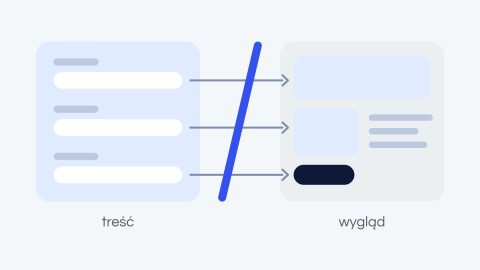
WordPress is a content management system, meaning software that separates your site’s content from its code. In practice, you add pages, posts and images from a clear dashboard, and the system takes care of the rest. You don’t need to know HTML or PHP to publish an article or change the text on your homepage.
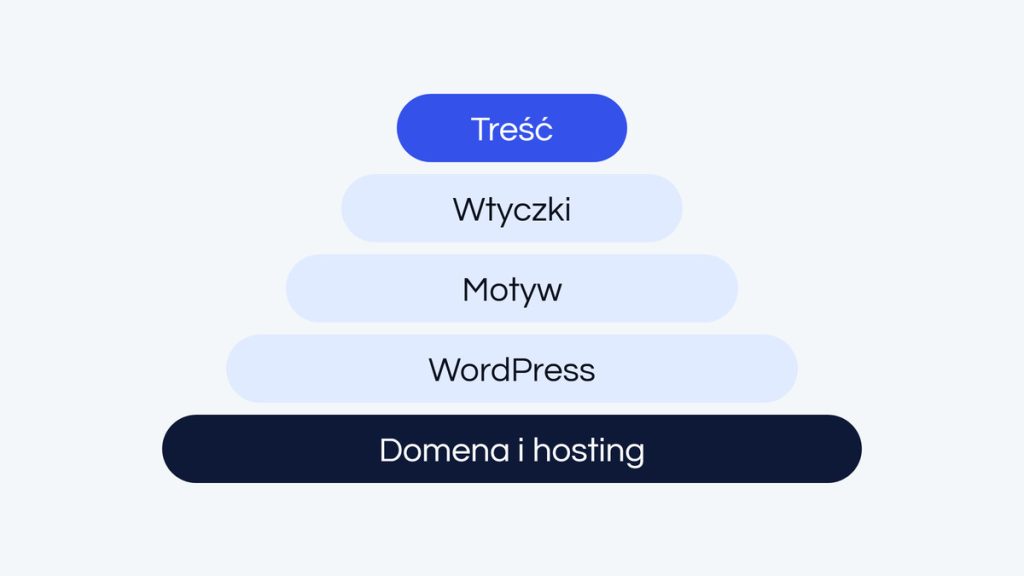
The real strength of WordPress, though, is its ecosystem. Thousands of themes handle the look, and plugins add features: forms, a store, search engine optimization. This flexibility is why the same engine runs both a simple food blog and a store with tens of thousands of products. For you, it means one thing: you don’t have to anticipate everything at the start, because the site can grow step by step.
Domain and hosting: the foundation everything stands on
Before the site exists, you need two things: a domain and hosting. The domain is the address where visitors will find you, for example yourcompany.com. Hosting is the server where your site physically lives. You can buy both from one provider or separately, and registering a domain is usually a small yearly expense.
Don’t skimp on hosting; this is probably the most important advice in this entire guide. A cheap, overloaded server slows the site down, and loading speed affects both your Google ranking and whether visitors stay at all. Hosting can be changed later, but it is one of the harder and more stressful operations, so it is better to choose well from the start than to fix it under pressure from growing traffic.
Installation and first steps in the dashboard
Most hosting providers offer one-click WordPress installation, so the whole process takes literally a few minutes. Once it is done, you log in to the admin dashboard at yourdomain.com/wp-admin. This is where you manage the whole site: you add content, change the look and install extensions.
The number of options can be overwhelming on your first login, but don’t worry: at the start you only need three sections: Appearance, Plugins, and Posts and Pages. You will learn the rest at your own pace as the site grows. Don’t try to master everything on day one, because that is the fastest way to get discouraged.
The theme: how your site looks
A theme is a template that determines the layout, typography and colors of the site. In the dashboard you will find hundreds of free themes, and thousands more are available on paid marketplaces. The temptation to pick the most feature-packed one, with dozens of ready-made layouts, is huge, and it is one of the most common beginner mistakes.
Bloated “all-in-one” themes add tons of code and features you will never use, which slow the site down and make later changes harder. You are much better off with a lightweight, well-rated theme that does less but does it properly. In web design, less really is more, and what you save at the start pays off over the entire life of the site.
Plugins: install only what you need
Plugins are extensions that add new capabilities to the site: a contact form, backups, SEO optimization or a gallery. It is tempting to install them generously; after all, most of them are free. The problem is that every additional plugin is more code that someone has to maintain, and it can slow the site down or become a backdoor for an attacker.
The healthy rule is simple: before you install something, ask yourself whether you really need it today. Five well-chosen plugins will always beat twenty installed “just in case.” The simpler the site is under the hood, the fewer things can break, and the less you have to keep an eye on.
Content, structure and the blog
Once the basics are in place, it is time for the reason the site exists in the first place: content. Start with the key pages, such as About us and Contact, and then move on to the blog if you plan to publish regularly. In the reading settings you decide whether the homepage should be a static welcome page or a list of your latest posts.
It pays to organize posts with categories and tags from the start, because this helps both readers and search engines find their way around your content. What matters most, however, is not frequency but value. One well-written article that answers a real question from your audience will do more for you than ten pieces written purely for volume.
Visual editors: convenience that comes at a price
Sooner or later you will come across visual editors such as Elementor or WPBakery. They let you build pages by “drag and drop” without touching code, and at first glance they look like the ideal solution for a beginner. And they really can speed up the start. But it is worth knowing the other side of the coin before you base the whole project on them.
Tools like these add a lot of extra code to the site, which means slower loading and worse scores in performance tests. Over time, a site built entirely with such an editor can also be harder to maintain, because its elements are tightly coupled and every change can trigger others. If you want a lightweight, fast site that will run for years, treat visual editors as a deliberate choice, not the default.
When it’s worth handing it over to specialists
Going it alone makes perfect sense for a simple blog or brochure site. It is a great way to learn WordPress and get a feel for how it works from the inside. Things change when integrations with other systems, a store, higher traffic or the migration of an existing site come into play. Then the time needed to learn and fix mistakes, plus the risk that something goes wrong, usually outweigh the savings of doing it yourself.
At moments like these, it is better to get a finished, polished product than an empty shell you then have to finish yourself. A good implementation is not just a nice look; above all, it is performance, security and code that can be safely developed in the future, including by someone else.
Planning a website or blog and don’t want to get stuck in the setup? Let’s talk about your project, and we will suggest the simplest sensible route, even if that means you can handle the start on your own.