WooCommerce PIM integration: when a European store needs a PIM and how to connect it
A WooCommerce store that sells only at home can keep product data in WooCommerce itself. Once it ships to three or four EU countries, every product needs names, descriptions and safety information in several languages, marketplaces want their own fields, suppliers send their own spreadsheets, and EU rules increasingly decide what a product page must show. The question then is where your product data should live.
This article covers what a PIM (product information management system) does, why product data is becoming a compliance topic in the EU, when a WooCommerce store needs one and when it does not, how a WooCommerce PIM integration works in practice and what popular systems cost. Prices checked on 3 November 2026.
What a PIM does, next to WooCommerce and your ERP
A PIM is the one place where product content is created and maintained: names, descriptions, attributes, specifications, images, documents and translations. It checks completeness per channel and language, supports roles and approvals, and publishes channel-specific versions of each product to your store, a marketplace, a print catalogue or a B2B portal.
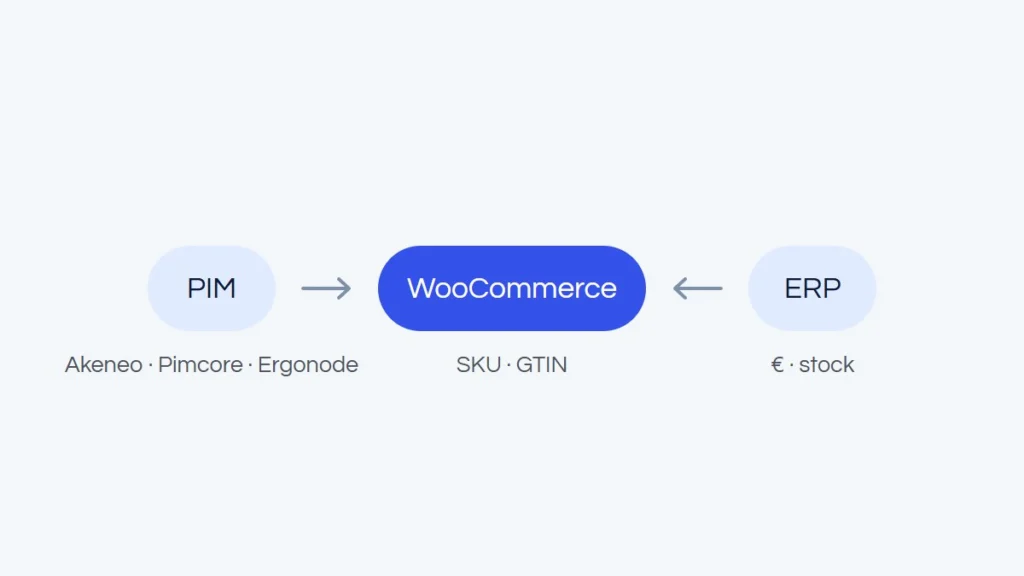
It does not replace your ERP, which stays in charge of prices, stock, orders and invoices, and it does not replace WooCommerce, where customers still buy. Think in terms of ownership: each piece of data has exactly one owner. Content belongs to the PIM, prices and stock to the ERP, orders to the store.
Why product data is now a compliance topic in the EU
GPSR: what an online offer must show
The General Product Safety Regulation (EU) 2023/988 has applied since 13 December 2024. Under Article 19, when consumer products are sold online, the offer must clearly and visibly show at least:
- the manufacturer's name, registered trade name or trademark, and a postal and electronic address;
- if the manufacturer is not established in the EU, the name and contact details of the responsible person in the EU;
- information that identifies the product, including a picture, its type and any other product identifier;
- any warnings or safety information, in a language consumers can easily understand, as determined by the Member State where the product is sold.
For a store with hundreds of brands and several markets, that is structured data: a manufacturer and responsible person per brand, identifiers per product, warnings per language. It is far easier to keep right as attributes in one system than as text in descriptions.
Digital Product Passport: one product group at a time
The Ecodesign for Sustainable Products Regulation (EU) 2024/1781 (ESPR) entered into force on 18 July 2024 and introduces the Digital Product Passport (DPP), a digital record of information such as composition, repair and end-of-life data. A passport becomes mandatory for a product group only once the Commission adopts a delegated act for that group, and the act also sets how the passport must be available to customers before they buy, including in distance selling.
The Commission calls its timeline indicative: iron and steel first (delegated act planned for Q4 2026), then textiles, tyres and aluminium (2027), furniture (2028) and mattresses (2029). Separately, the Batteries Regulation (EU) 2023/1542 requires a battery passport from 18 February 2027 for light means of transport batteries (such as e-bike batteries), industrial batteries over 2 kWh and electric vehicle batteries. If you sell in these categories, follow the delegated act for your product group, not general timelines. A store that already keeps product data structured in one place will have far less work adding passport data later.
When a WooCommerce store needs a PIM
- Several EU markets and languages. A Dutch store expanding into Belgium usually needs French next to Dutch, and Germany adds a third language. Translations must follow every product change.
- Several sales channels. Your store plus Amazon, bol.com, comparison sites or a B2B portal, each with its own fields and text limits.
- A large catalogue. Thousands of SKUs with specifications, units and variants.
- Supplier data. Every supplier sends its own attribute names and units, which have to be normalised before going live.
- Many editors. Product managers, marketing, translators and an agency need roles, approvals and a change history.
- B2B catalogues. Datasheets, certificates and assortments per customer group, as in B2B e-commerce for manufacturers and wholesalers.
When it does not
A small store does not need a PIM. With a few hundred products, one language, one channel and two people adding products, a PIM is an expensive middle layer: a licence or server, implementation, a data model, training and one more integration to maintain. You will get more from tidying up WooCommerce: global attributes instead of ones typed into each product, consistent naming, CSV imports for bulk changes and a WooCommerce ERP integration for prices and stock. A PIM solves a workflow problem. If the workflow is simple, it will not pay for itself.
How a PIM connects to WooCommerce
Data flows and a shared key
Content usually flows one way: the PIM sends names, descriptions, attributes, categories, media and translations to WooCommerce, and nobody edits that content in the store, because the next sync would overwrite it. The ERP sends prices and stock, and orders go from WooCommerce to the ERP. All three systems need one stable key, normally the SKU. Since version 9.2, WooCommerce also has a dedicated GTIN, UPC, EAN or ISBN field for products and variations, useful both for matching records and for the product identification GPSR asks for.
Ready-made connector or custom integration
Sales Layer lists a WooCommerce connector in its plan comparison (a paid add-on on the lower plans), and for Akeneo and Pimcore connectors come from third parties. Ergonode's price list names connectors for PrestaShop, Magento and Base.com (formerly BaseLinker), and Plytix sells Shopify, BigCommerce and Wayfair add-ons, so there WooCommerce is connected through APIs, middleware or feeds. WooCommerce itself exposes products, variations, categories and attributes through its REST API. Ready-made connectors suit simple catalogues, but their features are limited. Once the PIM model is richer than the store, or translations and custom fields come in, a custom integration is usually the better route.
Attributes, variants and categories
A PIM works with typed attributes: text, a number with a unit, an option list, yes or no, a file. WooCommerce has global attributes, shared across the store and used for filters and variations, and custom attributes that live on a single product. Decide early which PIM attributes become global WooCommerce attributes and which go into a specification table.
Variants need the same care. Akeneo allows one or two variant levels (a model, then colour, then size), while WooCommerce has one: a variable product and its variations. The integration has to flatten that structure and decide where colour-level images go. For categories, send the tree built for the store, and remember that moving categories changes URLs and needs 301 redirects.
Images and documents
Keep the originals in the PIM or a connected DAM. WooCommerce generates several image sizes for every upload, so the integration should send only new or changed files. Alt texts, datasheets and safety documents can come from the PIM too, each in the right language.
Translations with WPML or Polylang
In a PIM, a translation is an attribute value in a locale. In WooCommerce with WPML or Polylang, each language is a separate product linked to the original. With WPML and WooCommerce Multilingual, the REST API can create a product in a given language and link it to the original, but attribute names are translated in WPML's Taxonomy Translation screen, not through the API. Polylang needs the paid Polylang for WooCommerce add-on, and REST API access needs Polylang Pro. Products without a translation should usually stay out of that language version.
Large imports
By default, the WooCommerce REST API accepts up to 100 objects per batch request, so a first full import of tens of thousands of products with images can take hours and slow the store down. For large catalogues we sync only what changed since the last run, in queued batches, with images handled separately and heavy jobs outside peak hours.
Common problems
- The ERP and the PIM both write to the product name, and the store shows whichever arrived last.
- A description edited in WooCommerce is wiped by the next sync.
- "Black", "black" and "zwart" become three filter values.
- A product goes live in a new market before its safety information is translated.
- The integration stops after a plugin update and nobody notices for a week.
What PIM systems cost (as of November 2026)
List prices from the vendors' websites, checked on 3 November 2026, without implementation, hosting or integration.
| System | Free option | Paid editions | Notes |
|---|---|---|---|
| Akeneo | Community Edition: open source (OSL 3.0), self-hosted | Growth: from EUR 35,000 per year (EU price); Advanced and Premium: on request | Paid editions are SaaS; WooCommerce connectors from third parties |
| Pimcore | Community Edition (POCL licence): free for companies with annual revenue under EUR/USD 5 million, among others | Professional: USD 9,900 per year (EUR 8,400 per year in the Pimcore Store); Enterprise: USD 29,900 per year; PaaS: on request | Self-hosted or PaaS; WooCommerce connectors from third parties |
| Ergonode | Free: EUR 0, up to 1,000 products and 2 users | Advance: from EUR 5,990 per year; Scale: from EUR 19,990 per year; Enterprise: on request | SaaS; excluding VAT, billed annually in advance |
| Plytix | Standard: EUR 0 per month at 100 SKUs | Pro: from EUR 149 per month; Enterprise: from EUR 699 per month; price rises with SKU count, custom above 25,000 SKUs | SaaS; Shopify, BigCommerce and Wayfair connectors as add-ons |
| Sales Layer | None | All plans on request | SaaS; WooCommerce connector listed in the plan comparison |
Prices change, some vendors show different prices depending on the visitor's country, and many quote individually, so treat the table as a starting point and check the vendor's current price list. A free open-source edition still needs a server, updates and someone to look after it.
How we work
We have worked with Akeneo and Pimcore on Magento store projects, and we have come across Ergonode too. Day to day, we connect online stores with ERP, PIM and CRM systems. We start by agreeing which system owns which data, then map attributes, variants, categories and languages. If a ready-made connector covers your needs, we use it; when it falls short, we build a custom integration.
We test on a copy of the store, never on production, and an integration usually takes 2-4 weeks from the decisions to launch. We quote after a short conversation, because the scope depends on your data model, and ongoing monitoring is part of our maintenance package. See our ERP, PIM and CRM integrations or request a free quote.