PrestaShop 1.7 migration to version 8 and 9: how to upgrade your store safely
Many stores still run on PrestaShop 1.7. It works, so nobody wants to touch it. The problem is that 1.7 runs on an old PHP version that stopped getting security fixes long ago, and more and more payment, shipping and integration modules no longer support it. Sooner or later, upgrading stops being a choice and becomes a necessity.
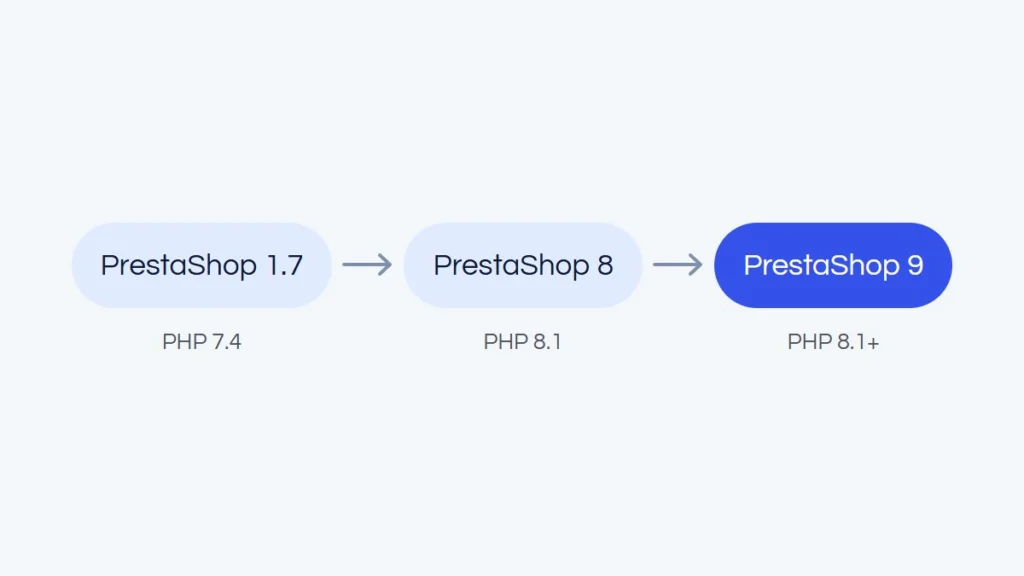
One clarification first, because it is a common question: there is no PrestaShop 1.8. After 1.7 the numbering changed, and the next releases are PrestaShop 8 (late 2022) and PrestaShop 9 (2025). Migrating from 1.7 therefore means moving to version 8 or 9.
Why PrestaShop 1.7 is a risk today
The last 1.7 releases run on PHP 7.1 to 7.4. Support for PHP 7.4, the newest of them, ended in November 2022. Since then, new vulnerabilities in that version have not been patched, and hosting companies are gradually removing old PHP versions from their servers.
Then there is the ecosystem. Module makers, payment providers and courier companies build their plugins for newer PrestaShop versions. A store on 1.7 is left with older and older modules that at some point stop working, for example after the provider changes its API. And a store holds customer data and orders, so security is not only a technical matter, it is also a GDPR one.
Version 8 or straight to 9?
PrestaShop 8 is the smaller step. It runs on PHP 7.2 to 8.1, and the changes from 1.7 are moderate enough that some modules and themes only need an update. Version 8 is already in its extended support phase, though, so it is more of a stopover than a destination for years.
PrestaShop 9 is a big change under the hood. It requires at least PHP 8.1, is built on Symfony 6.4 instead of 4.4, has a new admin API and a new theme, Hummingbird, which is not the default. The way modules can expose their files has also changed, so older modules more often need rework or new versions.
Which version is better for your store depends mainly on your modules. If your key modules already have versions compatible with 9, it is worth going straight to 9. If not, it makes more sense to move to 8 and plan the next step once the module makers catch up. The goal is a store that works as before, only safer, not the highest version number at any cost.
Upgrade or migration: what is the difference
PrestaShop has an official upgrade module, Update Assistant (formerly known as 1-Click Upgrade). On a clean store with a few standard modules, it can run the upgrade from the admin panel. With older versions, the upgrade usually happens in stages: first from 1.7 to 8, and only then to 9.
In practice, stores that have been running for a few years are rarely “clean”. They have paid modules, custom changes, overrides and a theme tailored to the brand. In that case a migration is often the safer route: a new, clean installation of the current version, moving the data (products, customers, orders, content) and rebuilding the features on compatible modules. It takes longer than clicking the upgrade button, but you get a store without the leftovers that come back to bite you later.
What usually causes trouble
- Paid modules. Some modules bought for 1.7 have separate versions for 8 and 9, often with a new license. Sometimes you need a replacement or a custom-built feature. It is good to know these costs before the work starts.
- Overrides and core changes. Changes made over the years directly in the PrestaShop code or through overrides are the most common source of errors after an upgrade. Each one needs a review and a decision on whether it is still needed.
- Theme. A theme written for 1.7 usually needs adjusting, and a heavily modified one is sometimes easier to rewrite than to patch.
- Integrations. Payments, couriers, invoicing, marketplaces, ERP and email marketing all need versions compatible with the new PrestaShop and the new PHP.
- Server. The new version needs a newer PHP and the right configuration. If your current hosting cannot provide it, moving the store to a new server is best planned as a separate stage.
How to migrate without downtime
- Backup and test environment. A full copy of the files and database that you can work on without affecting the live store.
- Migration audit. A list of all modules with a decision for each one (keep, update, replace, remove), plus a review of overrides, the theme and integrations. The plan and the quote are based on it.
- Migration on the copy. Upgrading PHP and PrestaShop, moving the data, updating or replacing modules, adapting the theme. Meanwhile, the live store keeps selling as usual.
- Testing. The whole checkout, payments, shipping, invoices, transactional emails, the admin panel and integrations. It is worth reviewing the test version yourself before the switch.
- Switch. In the lowest traffic window, with a full backup ready for a quick restore. Orders and customer accounts created during the work are moved just before the switch.
- Monitoring after launch. The first days are for catching small bugs that only show up with real traffic.

How not to lose your Google rankings
A migration is an easy moment to hurt your SEO by accident. Most importantly, product and category URLs should stay the same. If they have to change, every old URL should redirect (301) to its new equivalent, not to the home page. It is also worth checking that meta titles and descriptions, friendly URLs, the sitemap and product structured data have carried over.
After the switch, submit the new sitemap in Google Search Console and watch the indexing report for a few weeks. It is also a good chance to speed up the store, because newer PHP and PrestaShop versions perform better on their own.
What drives the time and cost
There is no single price for a PrestaShop migration, because two stores on the same version can need completely different work. The biggest factors are the number and type of modules, the amount of custom changes, the state of the theme, the number of integrations and whether the server changes too. That is why a reliable quote can only be given after a migration audit, not based on the version number alone.
Frequently asked questions
Is there a PrestaShop 1.8?
No. After version 1.7 PrestaShop changed its numbering, so the next releases are 8 and 9.
Can I go from 1.7 straight to 9?
With a migration, meaning a new installation and moving the data, yes. With an upgrade through the official module, it usually happens in stages, via version 8.
Will I lose orders, customers and store history?
You should not. Products, customers, orders and content are moved, and the latest orders are synced just before the switch.
Will the store go offline during the migration?
No. The work happens on a copy, and the switch itself is a short window, usually at night.
We handle PrestaShop upgrades and migrations from the audit to monitoring after launch. If your store runs on 1.7, see how a PrestaShop migration works with us, or describe your store in the free quote form. A good first step can also be a store audit, which shows the state of your modules and server.